By MarriageBiodata.App English Editorial TeamPublished
How to create a marriage biodata in Hindi
To create your marriage biodata in Hindi, write your name, date of birth, current city, education, work, brief family details and one contact for replies. Use clear Hindi labels, save a PDF and check it on your phone. Start with one readable page.
Choose Hindi if you and the families receiving your biodata read it comfortably. Your language does not establish your religion or community. You can use this format across faiths, or leave faith and community out.
Anatomy of a Hindi marriage biodata that gets a response
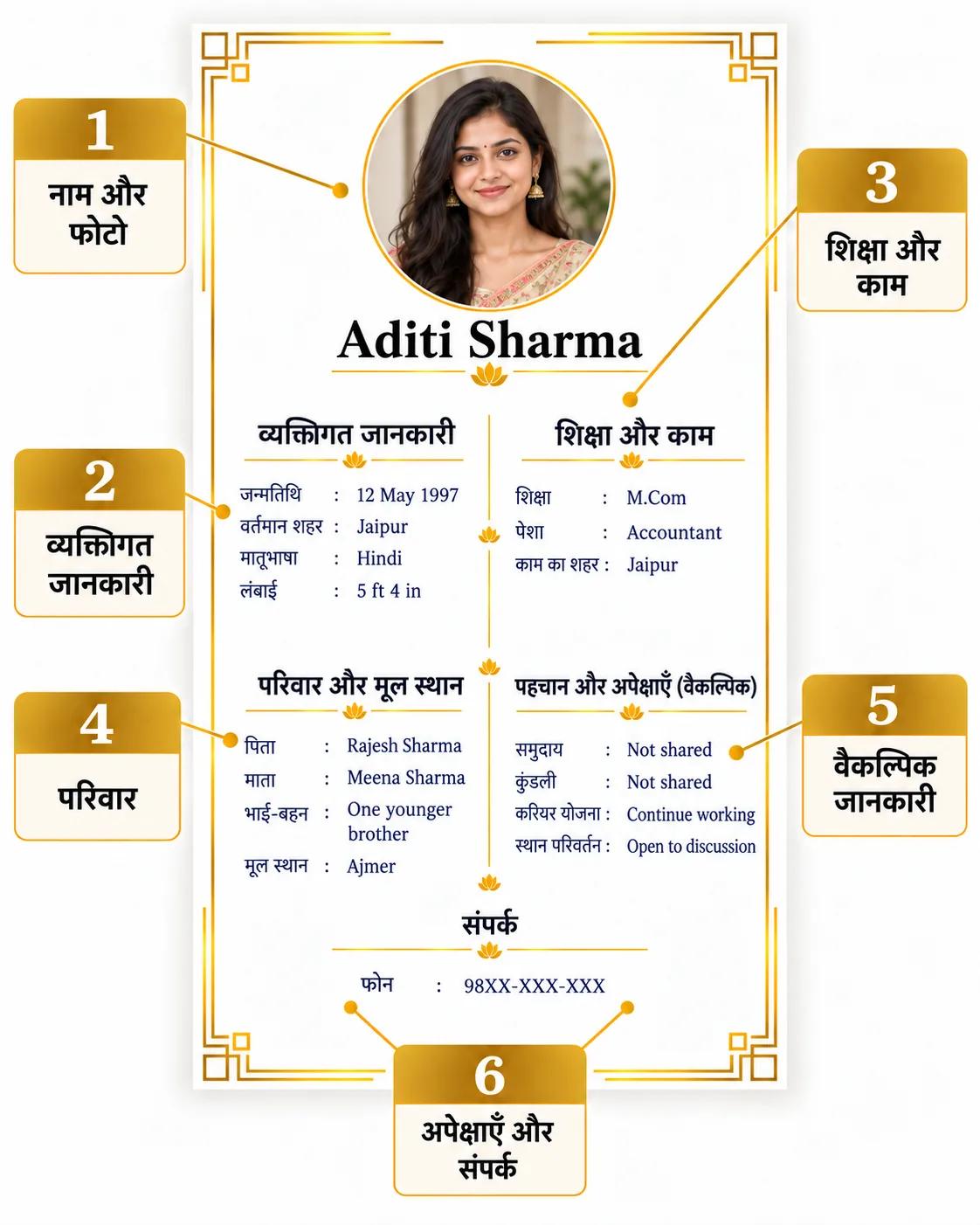
Use this fictional profile for Aditi Sharma in Jaipur to arrange your introduction. The English annotations explain fields you can write in Hindi. Replace every sample value with your own checked details.
1. Put your name and photo at the top
Use your preferred Hindi name spelling. Add an English spelling beside it if that helps with replies.
A photo is optional. If you want to improve the chance of a positive first conversation, include a recent, clear photo you are comfortable sharing. When your family helps prepare the biodata, agree on the photo together.
2. Label your personal details and location clearly
Under व्यक्तिगत विवरण, add your date of birth, current city and mother tongue, plus height or marital status if you choose. In the sample, you see 12 May 1997, Jaipur and Hindi. Write the month in words to avoid date ambiguity.
Keep वर्तमान शहर (current city), मूल स्थान (family roots or native place) and जन्मस्थान (birthplace) separate. You can live in Jaipur while your family has roots in Ajmer; neither tells you where you were born.
3. Describe your education and work
Under शिक्षा और काम, state your qualification, actual role or business, and work city. In the example, you see M.Com and accountant in Jaipur. Keep familiar degree and employer names as written; describe study or a career break plainly if that fits you. Share income only if you want to.
4. Give a little family context
Under परिवार, keep your introduction to a few agreed lines. In the fictional sample, you see father Rajesh Sharma, a teacher; mother Meena Sharma, a business owner; one younger brother; and family roots in Ajmer.
Check names and work details with your family. Add a relative's phone number only if you have agreed that they will receive replies.
5. Add identity or tradition details you actually use
Under समुदाय / परंपरा, state your chosen faith, community or subgroup if useful. You can omit this section, as in the fictional sample.
If you or your family value horoscope compatibility, include your verified birth date, time and place in a separate जन्म विवरण or कुंडली विवरण section. Add chart details only after checking them. You can share a full kundli later if requested.
6. Finish with your plans and one contact
Under अपेक्षाएँ, state practical plans about your work and where you want to live. In the example, you see plans to continue working and discuss relocation. Replace those with your own choices.
Under संपर्क, add your own number or one family contact who expects replies. The example names Aditi and masks the number as 98XX-XXX-XXX. Use a working number in your PDF. Keep your full address, identity documents and financial records for a later private exchange.
Choose community wording with your family
Start with the community or faith name you use at home, if you want to share it. The sources below document names or traditions; use the family questions as practical prompts for your own introduction.
- Brahmin: Ask whether you want a more precise community name and whether you use gotra or pravara. Add only verified terms. The Bajkhedawal Brahmin Samaj distinguishes these terms and acknowledges regional differences.
- Rajput: If you identify as Rajput, ask whether you want to state a clan name. Write the verified spelling and your native place if useful.
- Aggarwal or Agarwal: Agree on your preferred spelling and whether you want a gotra line. Check the value at home. Shree Agarwal Samaj includes gotra information; describe your actual work separately.
- Maheshwari: Ask whether you want to state Maheshwari or a more specific family description. Add your chosen wording and family roots if helpful; state your occupation separately.
- Kayastha: Decide whether you want to state Kayastha or a more precise description your family confirms. Add that wording if useful; do not infer your subgroup from a surname.
- Hindi-speaking Jain: Ask whether you want to state your faith, tradition or community. Young Jains of America's FAQ explains distinct Jain traditions. Describe your own diet if relevant; do not infer it from your surname.
- Hindi-speaking Muslim: Decide which faith or tradition wording you want to share and whether Hindi, Urdu or English works best for replies. Add your chosen wording. Use the Sunni guide or Shia guide for further detail where relevant.
- Hindi-speaking Christian: Ask whether you want to include your denomination or church connection and which language you prefer for replies. Add your agreed wording and leave out tradition fields you do not use.
If you use another identity, confirm the wording and add one short line if useful. Describe diet, career plans and relocation in your own words.
Create and check your Hindi PDF
Turn your agreed details into a finished biodata:
- Open Create My Biodata and choose Hindi in the language menu before entering your information.
- Type your details in Hindi, keeping degree names or job titles in English where helpful. Review the personal, family and contact sections; remove fields you do not want to share.
- Choose a readable free or paid template. Keep your name, photo and contact easy to find, and give Hindi text enough room.
- Check the preview. Use Edit to correct details, then preview again and download your PDF.
- Reopen the PDF on your phone before sending it. Keep an editable copy for later corrections.
Use Devanagari and an input method that produces Unicode text. The Department of Official Language recommends Unicode tools for sharing Hindi files. Choose a font that displays Hindi correctly, then check your exported PDF.
If possible, check the PDF on another device too. Look at the letters and vowel marks in your name, the spacing in words such as शिक्षा and जन्मस्थान, and any Hindi-English line breaks. Try selecting and copying a Hindi line from the PDF to see whether the text remains readable.
If you share separate Hindi and English versions, compare names, dates, work and contacts before sending either one.
Mistakes to avoid before sharing
- Copying the sample as your own profile. Replace every fictional detail and verify your own information.
- Guessing identity from a surname. Ask your family which description you use and whether you want it in your biodata.
- Confusing your location labels. Keep current city, family roots and birthplace distinct.
- Making your Hindi harder to understand. Use familiar words and recognised degree labels.
- Writing vague career claims. State your actual role and work city instead of “well settled.”
- Shrinking the text to fit everything. Remove repeated details or use a second page when necessary. You should be able to read the PDF on a phone.
- Skipping the PDF check. Review the exported Hindi text, photo and contact number.
Check your biodata before sending it
- Check your preferred name spelling in Hindi and any English spelling you include.
- Verify your date of birth and label your current city, native place and birthplace separately.
- State your highest qualification, actual work or study situation, and work city.
- Keep family details brief and agree on what you will share.
- Attach a recent, clear photo if you are comfortable sharing one.
- Add a community or faith line only if you want it and have verified the wording.
- Include verified birth date, time and place if you or your family value horoscope compatibility.
- Write your own career or location preferences and one contact who expects replies.
- Open the PDF on your phone and check Hindi letters, line breaks, photo and contact details.
Frequently asked questions
Should I write my biodata entirely in Hindi?
Use the language your intended reader understands comfortably. You can use Hindi field labels with familiar English degree or job names. If you need two versions, keep the facts consistent.
Should I add a photo to my Hindi marriage biodata?
You do not have to add one. If you want to improve your chances of a positive first conversation, include a recent, clear photo you are comfortable sharing. Agree on it together if your family helps prepare your biodata.
Should I include my birth details for horoscope matching?
If you or your family value horoscope compatibility, include your verified birth date, time and place. Add other chart details only if you use them and can confirm them.
Can I use this Hindi format if I am not Hindu?
Yes. Hindi is your choice of language. Use the faith, family and personal details that fit you, and omit sections you do not use.
Can I keep my degree and job title in English?
Yes. Use the official degree name and a job title your recipient understands. You can add a short Hindi explanation if it helps.
How can I check that my Hindi PDF displays correctly?
Open it on your phone and another device if available. Check names, vowel marks, line breaks and numbers. Compare it with your editable copy before sharing.
When your details are ready, create your marriage biodata and check the finished Hindi PDF on your phone.